Managing purchase options
Create, edit or delete the purchase options available for registration links.
In this section you can create, edit and/or delete the purchase options available for registration links. You can access it directly from the main screen of the plugin (see Registration links overview).
Purchase options are only available if the “Payments” plugin is enabled.
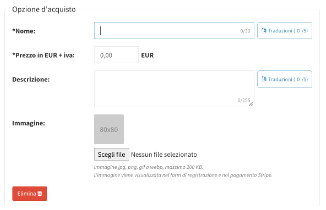
To create a new one, simply enter:
- Name: the name of the product or service to be purchased.
- Price: the cost of the product or service, in EUR + VAT.
- Description: a short description of what the user is purchasing.
- Image (optional): png, jpg, gif or webp image, maximum 200 KB, shown in the registration form and in the Stripe payment page.
You can enter translations for the name and description using the “Translations” button.
Once all the fields are completed, you can save the purchase option.
To delete a purchase option, click the red “Delete” button.
The purchase options you create can then be linked to registration links (see Creating a registration link).