History
Directly from the main screen of the plugin (see Registration links overview) you can access two archives: the registration history and the payment history.
REGISTRATION HISTORY
The registration history shows who registered, through which link, the data entered and any booking and/or payment made.

- Filter by link: from the drop-down menu you can view the registrations of all links or of a single link.
- Search: you can search for a registration by name, email or phone number.
- Registration list: each registration shows the date and time, name, email, the link used and the status (for example “Completed”).
- Details: click the arrow on the left of the row to view the data entered by the user and any booking and/or payment made.
PAYMENT HISTORY
The payment history lets you keep track of the status of transactions: who made them, when, through which link and the amount.
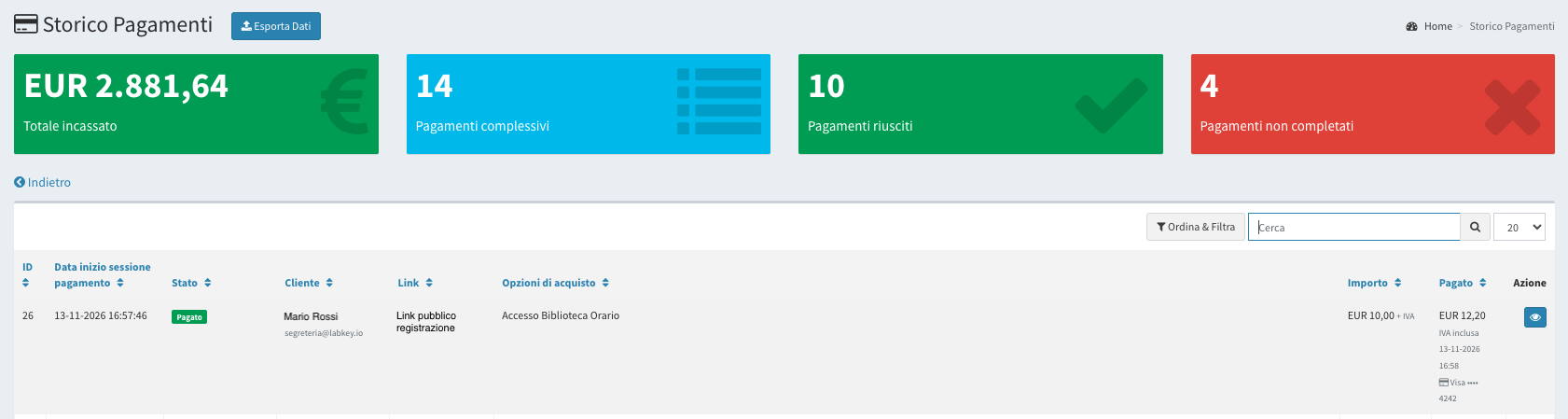
At the top of the page you will find a summary with:
- Total collected
- Total payments
- Successful payments
- Incomplete payments
The table shows, for each transaction: ID, payment session start date, status, customer, link, purchase options, amount (excluding VAT) and amount paid (including VAT), with date and payment method. Click the blue eye icon to view the payment details.
You can also sort and filter the results with the “Sort & Filter” button, search for a transaction using the “Search” field and export the data with the “Export Data” button.