Access Log Export
To view and manage the access records logged over the last three months, you can go to the “Log > Access Log” section from the Manage sidebar menu.
This section provides full details of entries, including data such as who entered, date and time, code used, and access result (allowed or denied). You can also receive information on the access method used, such as Mobile App or QR code.
NOTE: if you see a blue dot on the log row, it means that event was recorded while the control unit was offline.

Data Export
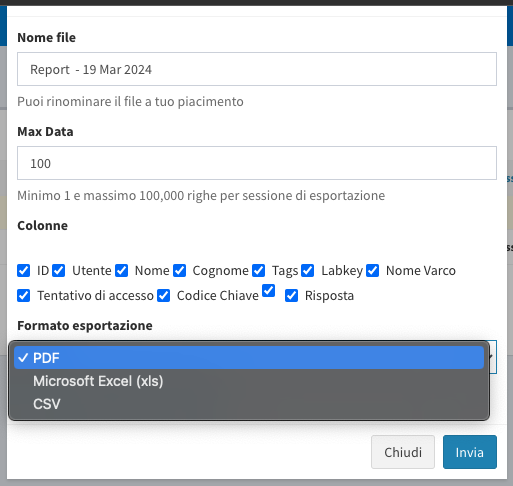
- Click “Export Data” at the top of the page.
- Select the fields you are interested in.
- Choose the desired export format (PDF, Excel, or CSV).
Time Clock Reports
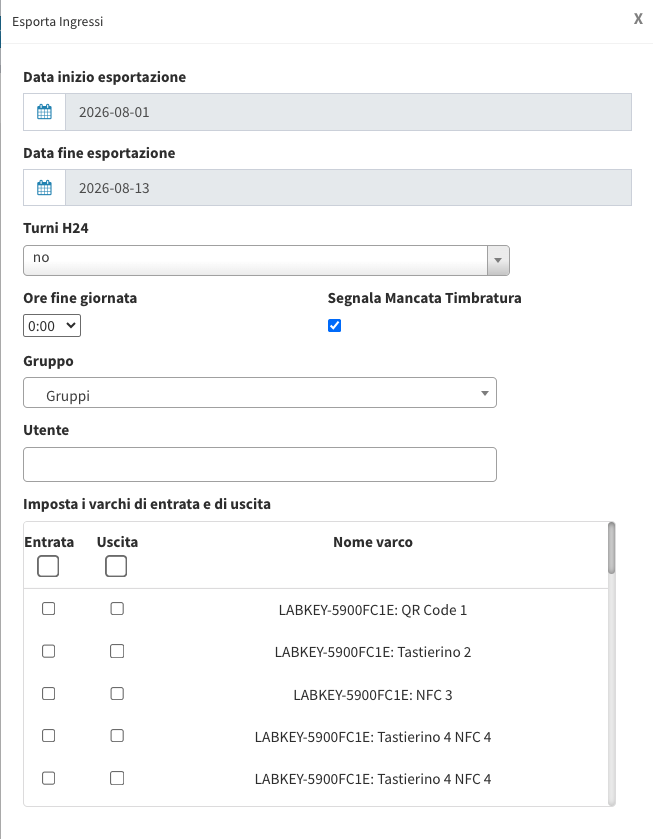
If LabKey is used as a time clock, you can download a detailed report of user check-ins and check-outs, with automatic calculation of the hours spent inside a room, building, or specific area.
- Click “Export Time Stamps” at the top of the page.
- In the popup that appears, select the period and the users to include in the report.
- Set the entry and exit LabKey devices.
- Click “Download” to get the report in Excel format, or “View” to preview it on the web.
These features enable advanced access management and the creation of detailed reports, providing effective support for monitoring and securing your access control system.