Common Integrations: How-To Guide
The most common integration patterns between LabKey’s access control and property management systems, booking platforms, and payment systems, with real examples already in production.
The technical design is simple and robust: you can connect your own software to your installation’s API layer and manage it independently.
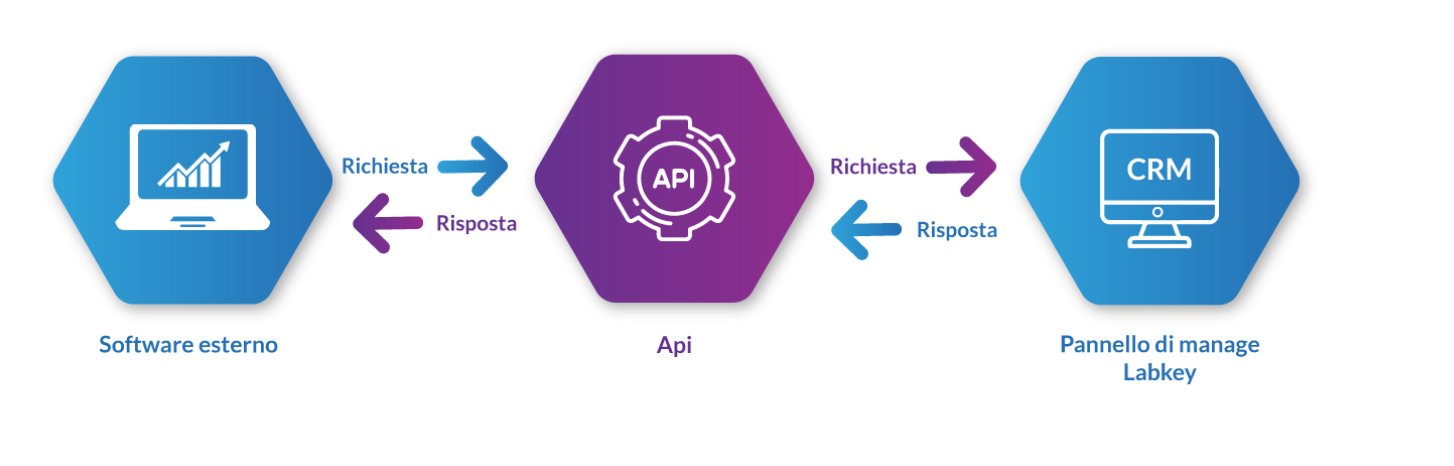
The API structure lets you carry out operations that simulate almost all the functions of the Manage panel supplied with the KIT. All calls must be activated and must originate from an authorized IP address.
Below you’ll find the complete guide to all available calls, organized by functional area. The same documentation is also available in interactive format on Postman: click here!.
NB: a hardened version of the API service is also available (API PRO), which lets you keep logs of API calls and issue remote opening commands — see the API Pro section or contact us to learn more.
For practical integration examples with booking systems, PMS, payment and reservation platforms, see Common Integrations: How-To Guide.
All calls (except the status check) require a Bearer token, obtained via the authorize call and passed as a header in subsequent requests.
authorize call.authorize call: unauthorized IP or incorrect secret_key (invalid_access), incorrect credentials (invalid_credentials), generic error (could not create token).invalid_token). Any specific errors are indicated in the messages field of the JSON response.POST /api/v2/authorize — Get the TokenReturns the Bearer token to use for all subsequent calls.
email (operator’s email), password (operator’s password), secret_key (associated with the authorized IP; found on the panel under API / Setup)tokeninvalid_credentials (incorrect email or password), invalid_credentials2 (unauthorized IP or incorrect secret_key), invalid_access1 (missing secret_key)GET /api/v2/ — Status CheckChecks that the panel is active and working (prints Test). Requires no authentication or parameters.
PUT /api/v2/adduser — Create New UserCreates a new user on the panel.
name, surnameemail, phone, prefix (URL-encoded country code, e.g. +39 → %2b39), tags (array; each comma is replaced with an underscore), status (1 = enabled, 0 = disabled), fields (array of custom fields in the format fields[field_id]=value)PUT /api/v2/updateuser — Update UserUpdates the data of an existing user.
user_id, name, surnameemail, phone, prefix, tags, status (1 = enabled, 0 = disabled), fields (array of custom fields, same format as AddUser)DELETE /api/v2/deleteuser — Delete UserDeletes a user from the panel.
user_idGET /api/v2/getusers — List UsersReturns the data of all users on the panel, or of a specific one if the optional parameter is passed.
user_id, tags (filters users by tag), getGrantInfo (if 1, also includes details of the associated access grants)GET /api/v2/users/getStatus — User StatusReturns whether a user is enabled or disabled.
user_idPOST /api/v2/users/changeStatus — Change User Status (not yet available)If status = 1 the user is enabled for access, if status = 0 they are disabled.
user_id, status (1 = enabled, 0 = disabled)GET /api/v2/getGroup — List GroupsReturns the data of all groups on the panel, or of one or more specific ones if the optional parameter is passed.
group_id (can be an array)POST /api/v2/grantAccessGroup — Grant Access to a GroupGrants one or more users access to one or more specified groups, creating the user-group association.
user_id (can be an array), group_id (can be an array)POST /api/v2/dropAccessGroup — Revoke Access to a GroupRevokes the access permissions of a user belonging to a group, removing the user-group association.
user_id (can be an array), group_id (can be an array)GET /api/v2/getcredits — Credit BalanceReturns the available credit balance.
GET /api/v2/getprices — Price ListReturns the price list for recharging credits.
POST /api/v2/recharge — Recharge CreditsPerforms a credit recharge.
user_id, amount (e.g. 10.50)GET /api/v2/getunusednfc — Unused NFC KeysReturns the list of NFC keys not associated with any user. No parameters required.
GET /api/v2/getallnfc — List NFC KeysReturns the data for all NFC keys on the panel, whether associated or not.
limit, offsetoffset used without limitPUT /api/v2/addkey — Add NFC KeyAdds a new NFC key.
nfc_key_code (RFID code read with a standard reader: it will be converted according to the LabKey standard — do not use a code taken from an access log), nfc_key_name (name to associate with the key)force_hex (forces conversion of the code from a hexadecimal string; if omitted, the conversion happens automatically only if the code contains at least one letter)PUT /api/v2/addkey2user — Assign NFC Key to UserAssigns an NFC key to a specific user.
user_id, nfc_key_idDELETE /api/v2/deletekey — Delete NFC KeyDeletes an NFC key.
nfc_key_code (RFID code converted according to the LabKey standard, e.g. 1234567890 → 210215073)nfc_key_codeGET /api/v2/getnfcdetails — NFC Key DetailsReturns the details of an NFC key.
nfc_key_code (code converted according to the LabKey standard)POST /api/v2/editnfc — Update NFC KeyUpdates the details of an NFC key.
nfc_key_code, namenfc_key_code not found or missing, missing namePOST /api/v2/edittastierino — Change Keypad CodeChanges the code of a keypad (pinpad).
old_pinpad_key_code (old code to replace), new_pinpad_key_code (new code)POST /api/v2/updatepinpad — Update Keypad Code for UserUpdates the keypad code by selecting the user.
user_id, new_pinpad_key_codePOST /api/v2/getqrcode — Generate QR CodeGenerates a QR Code for the selected user, usable starting from the “message string”.
user_idimage (if 1, returns the QR Code image base64-encoded), with_background (requires image=1; if 1, adds a decorative background to the image)POST /api/v2/getfasturl — Generate Fast URLGenerates the Fast URL for the selected user, usable starting from the fast_url field.
user_idGET /api/v2/getallpinpad — List Keypad CodesReturns all keypad codes and their details.
limit, offsetlimit and offset, or leave them both empty; limit/offset must be integersPOST /api/v2/getGrantInfo — Access DetailsReturns the data relating to the specified access grant.
involved_associations (one or more IDs returned by the grantaccess call)involved_associations must be sentinvolved_associations not foundPOST /api/v2/automategetGrantInfo — Simplified Access DetailsConvenience call to simplify the use of getGrantInfo.
user_id (can be an array), unique_name (can be an array — name of the selected LabKey unit)GET /api/v2/getuservarcodetails — User Gate DetailsReturns all the details on the gates associated with the selected user.
user_idPOST /api/v2/grantaccess — Grant AccessGrants access to a user. To configure a combination of multiple technologies (NFC, keypad, barcode), you can call this API multiple times, changing the key_id each time.
user_id, key_id (ID of the access key associated with the user: use nfc_key_id for NFC/Pocket, pinpad_key_id for keypad/barcode), data (JSON string with the parameters for each gate: date range datei/datef, time range houri/hourf, days of the week mo,tu,we,th,fr,sa,su, public holidays tv, command_device_id, id_rele, technology)check_overalapping, force_same_idrele_commanddeviceidPOST /api/v2/editaccess — Update AccessConvenience call that runs dropaccess and grantaccess in sequence, returning a new involved_associations for the user. This is not an atomic operation: if dropaccess completes successfully but grantaccess fails, the associations are removed regardless.
involved_associations (can be an array), user_id, key_id, data (JSON string, same format as GrantAccess)DELETE /api/v2/dropaccess — Revoke AccessRevokes access permissions.
involved_associations (code obtained from the grantaccess response)POST /api/v2/isAccessible — Check Gate AccessibilityChecks whether a gate is accessible within a given time range.
unique_name, from_date (timestamp), to_date (timestamp), id_releGET /api/v2/antipassback/ — Counter DetailsReturns the counter management details for the specified user and gate. The response is an array with the details for each relay.
user_id, unique_nameis_active (1/0, whether the counter is active), has_total/number_total (total access limit), has_day/number_day (daily limit), has_week/number_week (weekly limit), has_month/number_month (monthly limit)POST /api/v2/antipassback/update_or_create — Set CounterCreates or updates the counter configuration for one or more relays.
user_id, data (JSON string with, for each LabKey unit and relay, the fields is_active, has_total/number_total, has_day/number_day, has_week/number_week, has_month/number_month)is_active is set, only one of has_total, has_day, has_week, or has_month can be activated — they cannot be activated at the same time.GET /api/v2/getlabkeys — List LabKey UnitsReturns the details of the control units/LabKey units.
unique_name, labkey_id, key_tipeGET /api/v2/getbuildings — List FacilitiesReturns information on the facilities associated with the panel.
structure_id, structure_name, referentGET /api/v2/getlogs — Access LogsReturns the access logs.
from (start date), to (end date), unique_name (name of the LabKey unit), labkey_id, user_id, limit (pagination), offset (pagination)POST /api/v2/sendemail — Send EmailSends an email to a customer, for example with their access details.
user_id (recipient), operator_email (sender)message (custom message; if omitted, a default message is sent), cc_emails (array of CC addresses), show_sender_name, send_permissions_list, send_fast_url, send_qr_codeAlerts — Real-Time NotificationsLets you receive automatic notifications to your own endpoint every time an event occurs (e.g. an access). The webhook is configured from the Manage panel, in the Alert → Alert Standard section.
user_id, full_name, id_log, key_code, result_boolean (whether access was granted or not), timestamp, is_log_offline, unique_name, labkey_id, tags, event_typeManagement of the custom fields that can be associated with a user’s profile (see also Adding a New User).
GET /api/v2/customfields — List FieldsReturns the list of custom fields with their attributes.
limit, offsetGET /api/v2/customfields/{id_field} — Field DetailReturns the details of a specific custom field.
GET /api/v2/customfields/count — Field CountReturns the number of saved custom fields.
POST /api/v2/customfields/create — Create FieldCreates a new custom field.
type_field (text or date), name_field (max 255 characters)order (numeric), is_required (1 = required when filled in by the user), can_disable_user (1 = yes; usable only with type_field=date — the system automatically disables the user at midnight if the entered date has passed)POST /api/v2/customfields/{id_field}/update — Update FieldUpdates an existing custom field. Same parameters as create.
GET /api/v2/customfieldsuser/{id_user}/ — List Fields for UserReturns all the custom fields with values set for a user.
limit, offsetGET /api/v2/customfieldsuser/{id_user}/{id_field} — Field Value for UserReturns the value of a specific custom field for the specified user.
POST /api/v2/customfieldsuser/{id_user}/{id_field}/create — Set Field ValueCreates the value of a custom field for the user.
value (max 255 characters)can_disable_user (0 = no, 1 = yes)POST /api/v2/customfieldsuser/{id_user}/{id_field}/update — Update Field ValueUpdates the value of a custom field for the user. Same parameters as create.
Management of predefined templates for recurring access (see also Templates).
GET /api/v2/templates/count — Template CountReturns the number of saved templates.
GET /api/v2/templates/ — List TemplatesReturns the list of templates.
limit, offsetGET /api/v2/templates/detail — Template DetailReturns the detail of a specific template.
template_idPOST /api/v2/templates/addAccessUser — Apply Template to UserApplies an access template to a user. It can be used in two ways: by specifying both timestamp_start and timestamp_end (the system sets the access start and end to these values), or by specifying only timestamp_start and letting the system automatically calculate the end based on the template’s settings.
user_id, template_idtimestamp_start (default: now), timestamp_endManagement of holidays (see also Holidays): during the configured periods, the selected gates open only for permitted users.
GET /api/v2/festivita — List HolidaysReturns all holidays, or a specific one if the ID is passed.
idGET /api/v2/festivita/count — Holiday CountReturns the number of configured holidays.
idGET /api/v2/festivita/is_holiday — Check HolidayChecks whether a specific date/time falls within a holiday period.
datetime (format YYYY-MM-DD HH:MM:SS)unique_name, labkey_id, rele (array), user_idis_holiday (boolean)POST /api/v2/festivita/create — Create HolidayCreates a new holiday.
title, start_datetime (format YYYY-MM-DD HH:MM:SS), end_datetime (format YYYY-MM-DD HH:MM:SS)description, recurring (1 = recurring every year), notification_email, monday…sunday (1 = active on that day), varcos (JSON array of labkey_id/rele involved), user_ids (array of users involved)POST /api/v2/festivita/update — Update HolidayUpdates an existing holiday. Same optional parameters as create.
idtitle, start_datetime, end_datetime, recurring, active (1 = enabled, 0 = disabled), notification_email, monday…sunday, varcos, user_idsDELETE /api/v2/festivita/delete — Delete HolidayDeletes a holiday.
idThe most common integration patterns between LabKey’s access control and property management systems, booking platforms, and payment systems, with real examples already in production.